Cost Sharing is the portion of project costs not paid by sponsored award funds or contributions. The portion that is not funded by the award is “cost shared” and may be paid by UW funding or by an external entity (i.e., third-party). Cost Sharing may occur for salaries, a reduced fringe or F&A rate, or general funding. It may be required in a funding opportunity or per sponsor policies/requirements (i.e., mandatory), voluntary or as an in-kind contribution, and may occur on federal or non-federal awards.
Procedurally, all elements of cost sharing must be included in the budget information provided in RAMP, which is fed into Workday. There are specific requirements depending upon the type of cost sharing and if changes occur after the initial award approved budget. See the sections below for further information.
In general, the university's policy is to minimize institutional and third-party cost sharing on sponsored projects. Cost sharing may be allowed when mandated by the sponsoring agency or when necessary to accurately reflect the resources that must be expended to accomplish the project objectives. Most cost-sharing resources are supplied by the department, school, or college. In some instances, a school or college may create requirements in addition to RSP's guidance regarding cost sharing. Approval of voluntary committed cost sharing rests with the dean's and director's office.
Please direct any questions or requests for further information to the appropriate contact or email listed below. (The email inboxes are monitored daily.)
Cost Share policy UW-4012
RSP Guidelines for Cost Sharing
KBs
Workday Reports
Committed cost sharing: Includes mandatory cost sharing and voluntary committed cost sharing, as established on a project-by-project basis for sponsored awards.
Mandatory cost sharing: Cost sharing that is required by the sponsor as a condition for proposal submission and award acceptance.
Voluntary committed cost sharing: Cost sharing that is offered in a proposal budget but is not required by the sponsor as a condition of proposal submission. Once offered by the institution and agreed to by the sponsor, it becomes an obligation the university must fulfill.
Voluntary uncommitted cost sharing: Cost sharing that is over and above what is committed and budgeted for in a sponsored research agreement. It is neither pledged explicitly in the proposal nor stated in the award documents, but it occurs in the course of executing a project, primarily when an individual expends more effort on the project than their commitment requires. This type of cost sharing, or "extra effort," is above the level agreed to as part of the award and is not required to be documented, tracked, or reported. It is not included in the organized research base for the university's facilities and administrative rate, nor is it subject to effort reporting requirements.
UW payroll costs: Salaries paid by the university, and the associated fringe benefits, for UW faculty and staff who devote effort to sponsored projects.
Third-party costs: Expenses borne by a party external to the university used to meet a mandatory sponsor requirement. The third party may be a subrecipient. Types of expenses may include:
Allowable sponsored project expenses as defined by 2 CFR 200, Subpart E and paid by the university, other than salaries and the associated fringe benefits. These can include:
Direct costs funded through institutional support
In-kind or cash contributions toward a sponsored project's direct costs, supported by University of Wisconsin–Madison funds.
An In-kind contribution is an item of cost for which institutional support is already in place, such as investigator effort; no new cash outlay is required. The most common form of in-kind contribution occurs when salary and fringe benefits paid by the university are committed to a specific sponsored project. By contrast, a cash contribution is a new, incremental cost such as for equipment, travel, or additional staff necessary to conduct the sponsored project, and for which a new funding source must be identified.
Direct costs funded with third-party cash contributions
Cash contributions from third parties external to the university. Funds from the UW Foundation, the Wisconsin Alumni Research Foundation (WARF), and other state and private organizations may be used to pay the direct costs for a sponsored project.
With this method of cost sharing, the external organization provides a cash contribution to the university, and the cash is deposited into a UW account. This account becomes the funding source for project expenses. All associated financial transactions are well represented in the university's accounting systems, making this a relatively easy method to track.
Third-party in-kind contributions
Non-cash contributions from third parties external to the university. Instead of cash, the third party provides goods or services. This can include donated space, donated buildings or land, donated supplies, donated or loaned equipment, volunteer effort, or the paid effort of employees from an outside organization. The goods or services must directly benefit and be specifically identifiable to the project or program to which they are contributed.
Indirect costs
Facilities and administrative costs that are offered to meet a cost-sharing requirement. This can occur in two types of circumstances. First, every direct cost has its associated facilities and administrative cost. When a direct cost is cost shared, the associated indirect cost can (and typically should) be considered part of the university's cost-sharing commitment.
Second, some sponsored project proposals use a facilities and administrative rate that is lower than the university's standard rate. The difference between the diminished facilities and administrative recovery under the proposal's lowered rate and the recovery that would occur with the standard rate may be offered to meet a cost-sharing requirement with the permission of the sponsor.
The creation of the Cost Share Grant worktag starts in RAMP with a cost share budget and selection of the appropriate cost share terms and conditions. Financial transactions – including cost shared salary – are processed within Workday.
Mandatory cost share budgets and cost shared effort commitments are entered in RAMP at the time of award setup.
RSP Post Award Accountants follow this KB to make cost share entries: Create Journal - Cost Share Only . RSP Post Award Accountants enter the following types of cost share in Workday:
Important! When charging to cost share worktags, the cost share grant worktag is entered first; then the Program, Project or Gift being used for cost share is entered.
General information KB: Cost Share Touchpoints
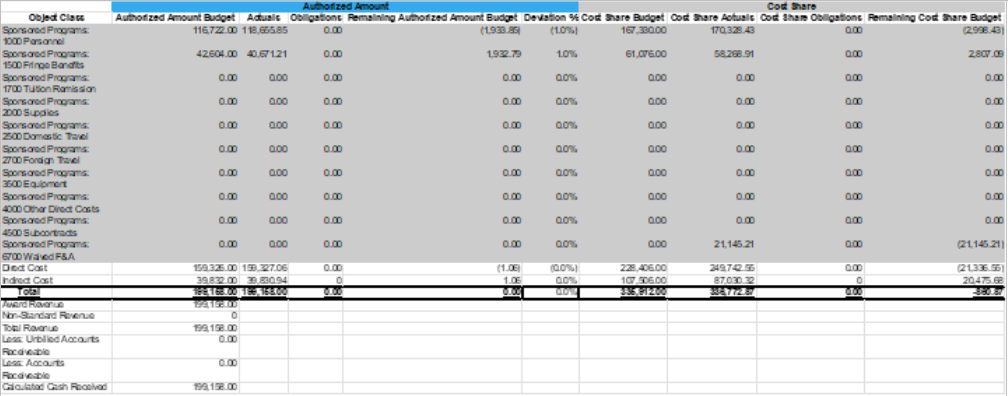
Example of a cost share budget in Workday:
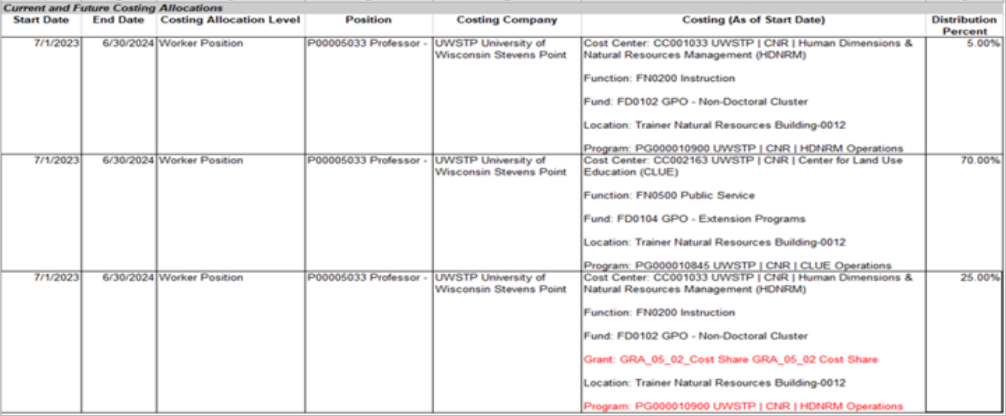
Example of how an employee's Payroll Costing Allocation appears in Workday:
RSP uses manual journals for entering 3rd party, subaward, unfunded F&A, and sponsor-to-sponsor (aka grant-to-grant or cost share provided by another sponsored project) cost share using this KB: Create Journal – Cost Share Only
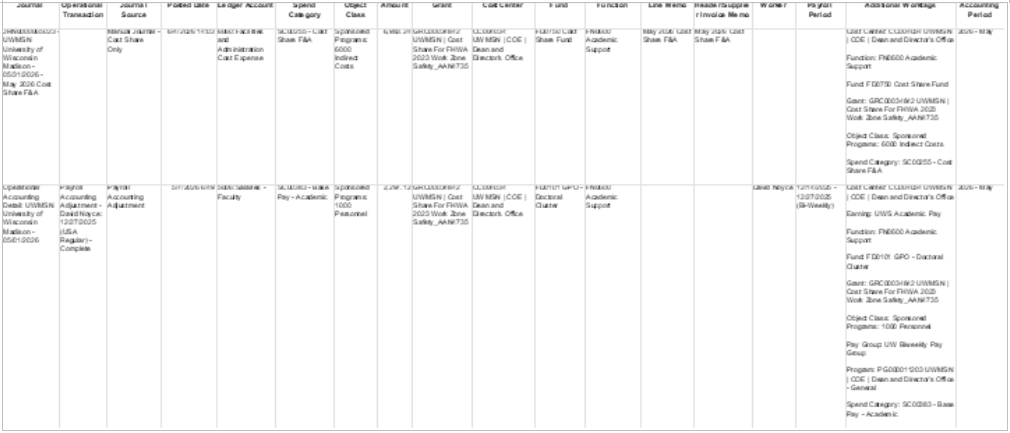
Example of payroll cost share transaction in Workday:
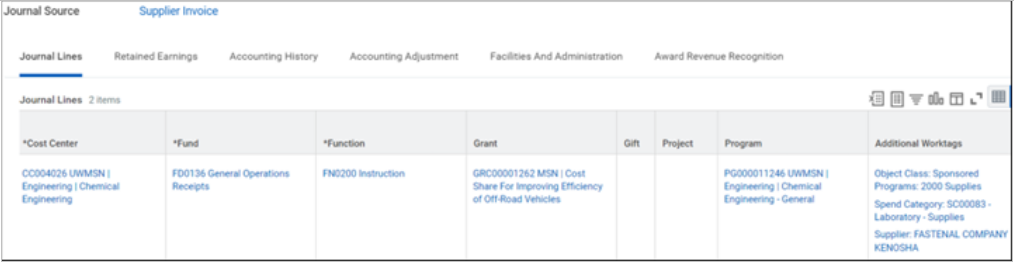
Example of non-payroll cost share journal in Workday:
Example of a transaction for cost share converted from SFS:

Procedures - Instructions for Departments, Schools, Colleges, and Divisions
Mandatory cost share grant lines and budgets will be created at the time of award setup. See Cost Share Entry in RAMP for details. Enter the detailed budget on the Award record in RAMP. On the Effort tab in RAMP, ensure that cost shared effort in person months is entered on the Cost Share grant line.
If a correction is needed or a budget or grant line was missed, submit an AMR – Cost Share Adjustment type in RAMP.
Voluntary committed cost sharing can occur when there are changes to the sources that pay for committed effort.
A maximum of one cost share award line is allowed on each award. Multiple cost centers can be allowed as worktags on one grant line. If additional cost centers are needed on a grant line, submit an Award Modification Request (AMR). Include clear instructions on the cost centers numbers which grant lines.
Note: When a cost share grant/award line is created along with award set up in RAMP, it is given a “GRC” number. When cost share grant lines are added later via a Modification, the grant line number will start with “GR”.
When transacting on cost share worktags, the cost share grant worktag is entered first; then the Program, Project or Gift being used for cost share is entered.
The entry of 3rd Party Cost Share within Workday can occur at any time during the life of the award. If the award has a reporting aspect (i.e. quarterly reporting of expenditures and cost share) then the entry of 3rd Party Cost Share is performed on a reoccurring basis to support those reporting requirements.
The provider of the third party's cost sharing contribution must send a letter or report to the PI, unit administrator, or RSP's post-award accountant that contains detailed information including:
This letter or report must be on the organization's letterhead and, if documenting an effort contribution, written after the individual has contributed the effort. Estimates cannot be accepted. The letter or report must be signed by an authorized representative of the organization and his/her title must be included
This is not a common type of cost share. Prior approval from both sponsors is required. Depending on the number of transactions, the RSP accountant can set up a schedule with the department for regular reporting.
Submit an AMR – Cost Share Adjustment type with EIB and approval documentation attached. This is the department's request for approval for grant-to-grant cost share. Campus sends this request each time; Cost Share Accounting Journal EIB Template ,
Third-party cost share is most frequently received on an approved subaward (supplier) invoice. Subaward third-party cost share is most common on subawards issued under Department of Energy funding, but it may also occur on subawards under other sponsors.
For subaward third-party cost share, it is best practice to ensure that the supplier invoice has been fully approved by the PI prior to entering the third-party cost share documented on the invoice. The supplier invoice should be paid, and the accompanying cost share journal should be entered within the same month or invoicing period to ensure proper alignment for our prime level reporting.
In cases where the PI receives a stand-alone cost share report directly from a subawardee, the department submits an AMR in RAMP with this supporting documentation to route to the RSP accountant for review and Workday entry.
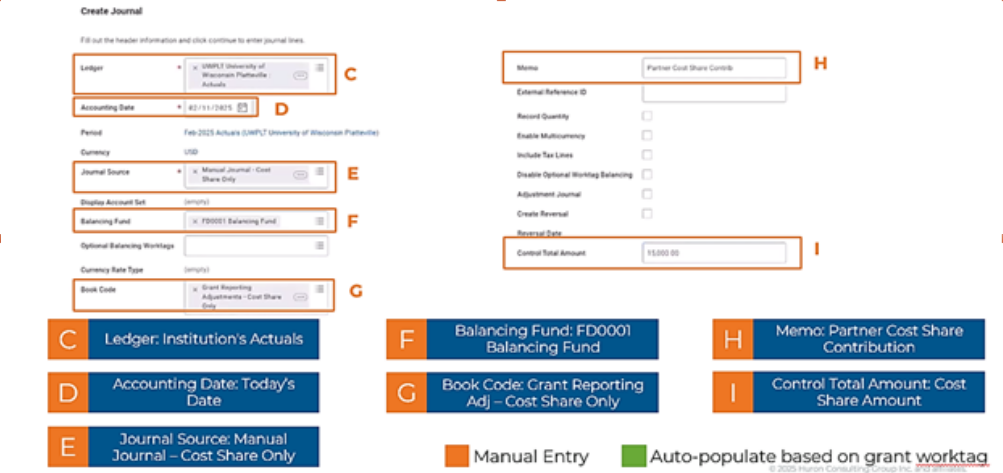
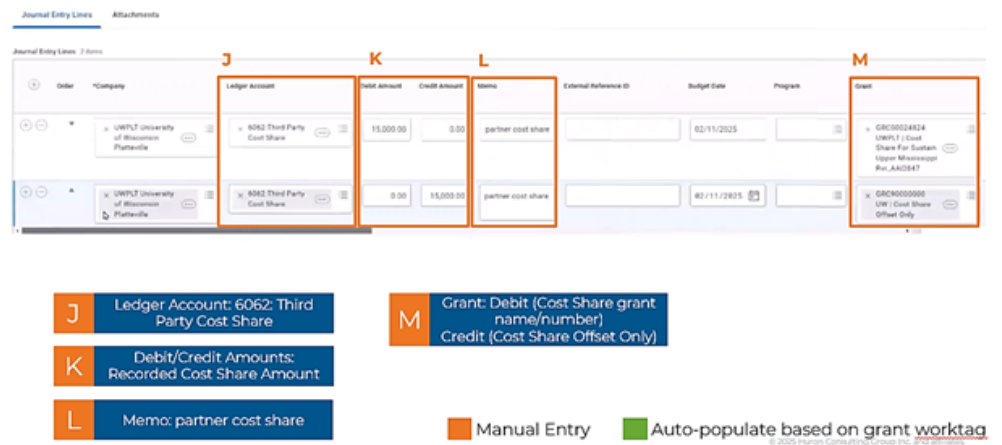
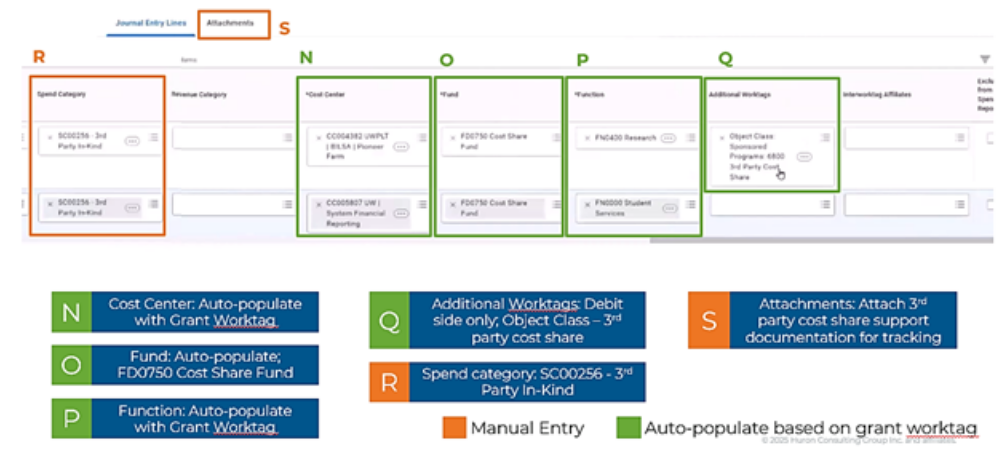
The RSP accountant creates a journal to add third-party cost share to the cost share grant worktag. In most cases, third-party cost share should be entered as separate journal entries, but an EIB can be used in high-volume (50 or more rows) scenarios.
The principles of third-party cost share accountant review are the same as the general cost share review. Special terms & conditions regarding cost share (supporting documentation requirements, cost share invoicing percentage thresholds, etc.) should typically flow down to our subawardees. Accountants should review supplier invoices and cost share documentation for adequacy and accurateness. RSP accountants and departments should monitor cumulative third-party cost share contributions to ensure compliance with obligations and terms & conditions and promote proactive award management.
Unrecovered indirect costs due to waived or lowered F&A rates in the agreement can be used as cost share in some cases.
The RSP Accountant will create the manual journal in Workday.
The amount to be used as unfunded F&A is the difference between the F&A rate in place at the time of award and the awarded F&A rate. For example, UW F&A rate on research awards is 55% (for specific rates in effect, see F&A Rates ); however, the sponsor only allows the use of 35% F&A. The difference, 20%, would be used to calculate the amount of F&A that would have been chargeable to the grant, but instead will be used as cost share
When an accountant has an award with this type of cost share, the following actions are taken at award setup:
The process to post unfunded F&A cost share:
F&A on UW payroll/non-payroll cost share transactions runs at month-end; it is part of the process completed by ERA.
See Cost Share Entry in RAMP for details.
Note: When a cost share grant/award line is created along with award set up in RAMP, it is given a “GRC” number. When cost share grant lines are added later via a Modification, the grant line number will start with “GR”.
Voluntary committed cost sharing can occur when there are changes to the sources that pay for committed effort. For example, an investigator commits 30% effort to an award and intends to charge 30% of their salary to that award. Subsequently, the investigator decides to charge only 20% of their salary to the award. This can occur for a variety of reasons. The result is 10% voluntary committed cost sharing, even though neither the proposal nor the award document indicated an explicit cost-sharing commitment.
Campus will submit an AMR - Cost Share Adjustment type to RSP when a cost share grant line/worktag is needed. A budget is not needed for voluntary committed cost share.
RSP will follow these instructions to add the cost share grant line via an Award Modification in RAMP - Budget Allocation Type. No categorical budget is entered. See RSP Adding a Cost Share Worktag guidance_4.2.2026.pdf for details.
A maximum of one cost share award line is allowed on each award.
Note: When a cost share grant/award line is created along with award set up in RAMP, it is given a “GRC” number. When cost share grant lines are added later via a Modification, the grant line number will start with “GR”.
Campus submits an Award Modification Request - Cost Share Adjustment type. The unit is responsible for ensuring the UW-Madison budget is attached to the AMR.
RSP completes a RAMP Modification - Budget Allocation Type
On the Budget Allocation tab in RAMP for mandatory cost share: Set to “Authorized by Sponsor” and the budget entered will be the direct and indirect amounts will be UW-Madison portion of the mandatory cost share budget, along with the correct IDC % for the mandatory cost share budget.
On the Budget Reconciliation tab in RAMP for mandatory cost share: The UW-Madison portion of the mandatory cost share budget should be categorized into the corresponding budget categories on the Budget Reconciliation page.
On the Effort tab in RAMP, the unit is responsible for ensuring that cost-sharing effort is documented if Mandatory or Voluntary Committed salary cost-sharing exists. The unit enters the cost shared effort in person months on the Cost Share grant line.
A maximum of one cost share award line for voluntary and one cost share award line for mandatory is allowed on each award.
Cost share expense review is essentially the same as review of any expenses on an award. Review frequently and don't wait until the end of the award to review. Along with the review of expenses, post-award accountants review cost share for the following:
RSP accountants work with department research administrators to ensure allowability and that mandatory cost share requirements are met and documented.
This should not be a common type of cost share. Prior approval from both sponsors is required. Depending on the number of transactions, set up a schedule with the department to report to the accountant.
The entry of 3rd Party Cost Share within Workday can occur at any time during the life of the award. If the award has a reporting aspect (i.e. quarterly reporting of expenditures and cost share) then the entry of 3rd Party Cost Share is performed on a recurring basis to support those reporting requirements.
The provider of the third party's cost sharing contribution must send a letter or report to the PI, unit administrator, or RSP's post-award accountant that contains detailed information including:
Third-party cost share is most frequently received on an approved subaward (supplier) invoice. Subaward third-party cost share is most common on subawards issued under Department of Energy funding, but it may also occur on subawards under other sponsors.
For subaward third-party cost share, it is best practice to ensure that the supplier invoice has been fully approved by the PI prior to entering the third-party cost share documented on the invoice. The supplier invoice should be paid, and the accompanying cost share journal should be entered within the same month or invoicing period to ensure proper alignment for our prime level reporting.
In cases where the PI receives a stand-alone cost share report directly from a subawardee, the department submits an AMR in RAMP with this supporting documentation to route to the RSP accountant for review and Workday entry.
The RSP accountant creates a journal to add third-party cost share to the cost share grant worktag. In most cases, third-party cost share should be entered as separate journal entries, but an EIB can be used in high-volume (50 or more rows) scenarios.
The principles of third-party cost share accountant review are the same as the general cost share review. Special terms & conditions regarding cost share (supporting documentation requirements, cost share invoicing percentage thresholds, etc.) should typically flow down to our subawardees. Accountants should review supplier invoices and cost share documentation for adequacy and accurateness. RSP accountants and departments should monitor cumulative third-party cost share contributions to ensure compliance with obligations and terms & conditions and promote proactive award management.
Unrecovered indirect costs due to waived or lowered F&A rates in the agreement can be used as cost share in some cases.
The amount to be used as unfunded F&A is the difference between the F&A rate in place at the time of award and the awarded F&A rate. For example, UW F&A rate on research awards is 55% (for specific rates in effect, see https://rsp.wisc.edu/rates/); however, the sponsor only allows the use of 35% F&A. The difference, 20%, would be used to calculate the amount of F&A that would have been chargeable to the grant, but instead will be used as cost share
When an accountant has an award with this type of cost share, the following actions are taken at award setup:
The process to post unfunded F&A cost share:
Usually, we need to provide other cost share first. If we fall short of the requirement, then we can use unfunded F&A at the end of the award.
F&A on UW payroll/non-payroll cost share transactions runs at month-end; it is part of the process completed by ERA.
When generating an SF425, certain pieces of cost share are missing from that document that will need to be added with PDF edit.
Workday Reports
Coming soon:


